Leaderboard




Popular Content
Showing content with the highest reputation on 06/06/21 in all areas
-
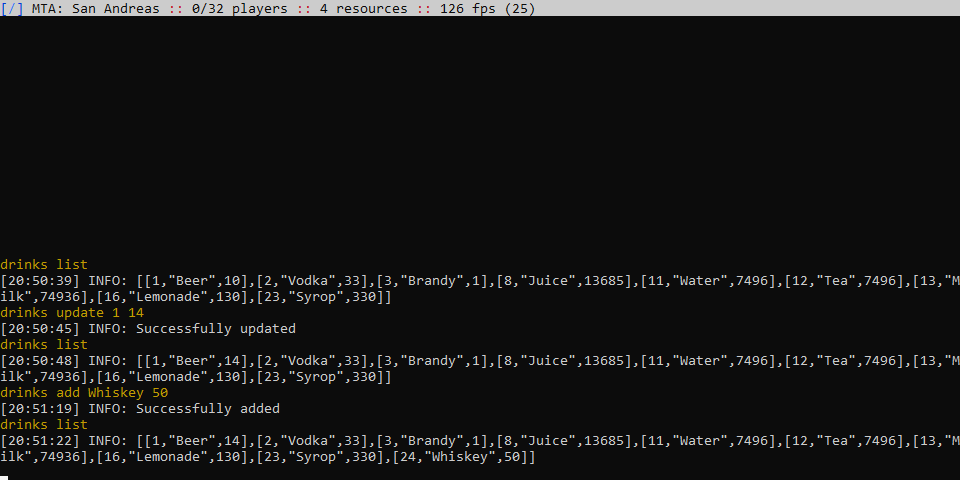
Part 0; Preamble At the moment we have a long discussion about databases in the MTA Community, a huge part of the Team thinks that DB-drivers must be only as modules, but right now, we have only RDBMS databases(SQLite and MySQL). It isn’t enough for many dynamic MTA servers. So, I want to suggest an interesting solution to this problem, so let’s get started! Part 1; Tarantool When we think about DODBMS the first variant of this is MongoDB. MongoDB works well with JS, like nodejs, but I want to present to you the DODBMS which work with Lua. This database is sometimes similar to MongoDB, but it works only with Lua(and SQL but I don’t get it). You can put the data there, get it, and write functions. Cool! And this DBMS is used in production, the developer of this DB is MailRu Group, so, take my word for it, these clients are serious guys, especially MasterCard. Part 1.1: Setting and installing Tarantool https://www.tarantool.io/en/download/os-installation/debian/ After installing launch the command `tarantool` and load global config with command box.cfg{} Part 1.2: The space’s markup I'll try to make a managed alcohol list, so watch my hands -- a sequence box.schema.sequence.create('drinks_seq', { if_not_exists = true }) -- a space, like a table in MySQL box.schema.create_space('drinks', { if_not_exists = true, format={ { name = 'id', type = 'unsigned'}, { name = 'name', type = 'string'}, { name = 'count', type = 'unsigned'}} }) -- an index box.space.drinks:create_index('pk', { parts = { 'id' }, if_not_exists = true }) -- Insert 13 bottles of beer box.space.drinks:insert{box.sequence.drinks_seq:next(), 'Beer', 13} That’s all, the cascade has done! Part 1.3: Fall in love workarounds Without spoilers, our workaround is fetchRemote, so, do the server. Any solution from: https://github.com/tarantool/http#installation And take a look to my code: #!/usr/bin/env tarantool local http_router = require('http.router') local http_server = require('http.server') local json = require('json') -- Load default config box.cfg{} -- Start the server -- WARNING: 0.0.0.0 listen the port for all interfaces, don't do it, use 127.0.0.1! local httpd = http_server.new('0.0.0.0', 3820, { log_requests = true, log_errors = true }) local router = http_router.new() -- GET endpoint, returns data from database router:route({ path = '/drinks', method = 'GET' }, function() -- Load space local dspace = box.space.drinks -- Select all, too risky read more about select and limits -- Here: https://www.tarantool.io/en/doc/latest/reference/reference_lua/box_index/select/ local drinks = dspace:select{} return {status = 200, body = json.encode(drinks), headers = { ['content-type'] = 'application/json; charset=utf8' }} end ) -- PUT endpoint, add data to the database router:route({ path = '/drinks', method = 'PUT' }, function(req) local dspace = box.space.drinks -- [1] is https://github.com/multitheftauto/mtasa-blue/issues/1073 local body = req:json()[1] -- box.sequence.drinks_seq:next() is auto-increment local drinks = dspace:insert{box.sequence.drinks_seq:next(), body.type, tonumber(body.count)} if drinks then return {status = 200, body = json.encode(drinks), headers = { ['content-type'] = 'application/json; charset=utf8' }} else return {status = 200, body = '{"status": "something went wrong"}', headers = { ['content-type'] = 'application/json; charset=utf8' }} end end ) -- POST endpoint, edit the data in the database router:route({ path = '/drinks', method = 'POST' }, function(req) local dspace = box.space.drinks -- [1] is https://github.com/multitheftauto/mtasa-blue/issues/1073 local body = req:json()[1] -- Well... Complicated thing (not much) -- update(key, {{ = is assignment, number of field, value}, ...}) local drinks = dspace:update(tonumber(body.id), {{'=', 3, tonumber(body.count)}}) if drinks then return {status = 200, body = json.encode(drinks), headers = { ['content-type'] = 'application/json; charset=utf8' }} else return {status = 200, body = '{"status": "something went wrong"}', headers = { ['content-type'] = 'application/json; charset=utf8' }} end end ) httpd:set_router(router) httpd:start() After that we have to start it. cd /path/to/saved/script && chmod +x ./server.lua && ./server.lua Part 2.0: MTA resource The communication side will be simple command drinks with interactive options. local url = "http://127.0.0.1:3820/drinks" -- GET endpoint function showDrinks() local sendOptions = { queueName = "tarantool.drinks.get", method = "GET", } local successRemote = fetchRemote(url, sendOptions, function (responseData, responseInfo) local error = responseInfo.statusCode if error == 200 then print (responseData) end end ) end -- PUT endpoint function addDrinks(arg) local data = { type = tostring(arg[1]), count = tonumber(arg[2]) } local sendOptions = { queueName = "tarantool.drinks.add", postData = toJSON(data), method = "PUT", } local successRemote = fetchRemote(url, sendOptions, function (responseData, responseInfo) local error = responseInfo.statusCode if error == 200 then print ("Successfully added") end end ) end -- POST endpoint function updateDrinks(arg) local data = { id = tonumber(arg[1]), count = tonumber(arg[2]) } local sendOptions = { queueName = "tarantool.drinks.update", postData = toJSON(data), method = "POST", } local successRemote = fetchRemote(url, sendOptions, function (responseData, responseInfo) local error = responseInfo.statusCode if error == 200 then print ("Successfully updated") end end ) end -- Command handler addCommandHandler("drinks", function(ply, cmd, ...) local arg = {...} local subcmd = arg[1] -- subcmd is useless in the table table.remove(arg, 1) -- case/switch if subcmd == 'list' then showDrinks() end if subcmd == 'add' then addDrinks(arg) end if subcmd == 'update' then updateDrinks(arg) end end) And… That’s all. Look at the screenshot, it works! Conclusion: By the idea it must be simple only in resource without HTTP middleware, but at the moment it is impossible due to slow moving MTA progress, so if you like my tutorial and want to push my solution without middleware push ? and talk about it there. A solution without workaround: https://github.com/multitheftauto/mtasa-blue/issues/2208
 5 points
 -
Salutări și bun venit pe comunitatea MTA! Dacă te referi la comenzile standard disponibile, le poți vizualiza tastând 'help' în consola server-ului.2 points
-
really haha, I ended up not paying attention to this because I was pretty tired of the script already, thank you1 point
-
Try: /stop joinquit in chat. (if I remember correctly that’s how it’s called the default join/quit resource)1 point
-
thank youuu so much1 point
-
What about dxGetTextWidth(getPlayerName(v), 1,settings.font,true) + 270 * scale -- or if the font is scaled: dxGetTextWidth(getPlayerName(v), scale,settings.font,true) + 270 * scale for the width.1 point
-
Hey, Don't forget that variable names are case sensitive! local Vendedor = createPed( 179, 308.36, -143.3 , 999.602 , 0 ) local Vendedor1 = createPed( 179, 316.48, -133.333, 999.602 , 90 ) And now check the names you used in the damage events. Do you notice something wrong ? ?1 point
-
-- (server side) function onPlayerCommandHandler(cmd) local playername = getPlayerName(source) outputChatBox(playername .. " entered command " .. cmd, root, 255, 0, 0) end addEventHandler("onPlayerCommand", root, onPlayerCommandHandler) source is the element of the player that entered the command, you can get the name using getPlayerName; the first parameter passed to the handler function is the command string that was entered.1 point
-
Your thread has been moved into a better section for receiving help with scripting1 point
-
We have reason to believe that you're involved in malicious activity targetting MTA servers/users, and because we want to protect everyone, you're out. Ban appeal denied, this is a final decision1 point