IIYAMA
-
Posts
6,097 -
Joined
-
Last visited
-
Days Won
218
Everything posted by IIYAMA
-
It is not as if players can download every file from the server. If they could, they would be able to steal all your stuff. You need to serve the file first with a webserver. Read: https://wiki.multitheftauto.com/wiki/Resource_Web_Access <html src="sound.mp3" raw="true" />
-
After you have set-up your meta table + overwrite exports. https://www.tutorialspoint.com/Lua/lua_metatables.htm --[[ ... ]] __index = function(mytable, key) local resource = getResourceFromName(key) if not resource then return false end return function (...) return call(resource, ...) end end --[[ ... ]] It is not 100% the same, but you got the idea.
-
You can also use call instead of exports. Which uses a static resource pointer that doesn't change when a resource restarts. Less fancy, I know. But you can use it to make a wrapper when you overwrite exports with a meta table.
-
getRealTime: https://wiki.multitheftauto.com/wiki/GetRealTime It returns by default the current date. timestamp can help you with calculate offset. Easy to use and no formatting required. local timestamp = getRealTime().timestamp -- seconds local days = 10 local futureTimestamp = timestamp + (60 * 60 * 24 * days) if timestamp >= futureTimestamp then end To get other date formats. Member Meaning Range second seconds after the minute 0-61* minute minutes after the hour 0-59 hour hours since midnight 0-23 monthday day of the month 1-31 month months since January 0-11 year years since 1900 weekday days since Sunday 0-6 yearday days since January 1 0-365 isdst Daylight Saving Time flag timestamp seconds since 1970 (Ignoring set timezone) local time = getRealTime() local hours = time.hour local minutes = time.minute These are the bricks you can use and the rest is up to your math skills.
-
Doesn't the event onClientKey detects hold? hmmm Well if it doesn't: local nextCharacterRemoveTime = 0 local characterRemoveInterval = 200 function checkCharacterRemove () if getKeyState ( "backspace" ) then -- https://wiki.multitheftauto.com/wiki/GetKeyState local timeNow = getTickCount() if timeNow > nextCharacterRemoveTime then nextCharacterRemoveTime = timeNow + characterRemoveInterval -- strip the string! end end end function isEventHandlerAdded( sEventName, pElementAttachedTo, func ) if type( sEventName ) == 'string' and isElement( pElementAttachedTo ) and type( func ) == 'function' then local aAttachedFunctions = getEventHandlers( sEventName, pElementAttachedTo ) if type( aAttachedFunctions ) == 'table' and #aAttachedFunctions > 0 then for i, v in ipairs( aAttachedFunctions ) do if v == func then return true end end end end return false end local function backspacePress ( button, press ) if button == 'backspace' then if press then if not isEventHandlerAdded("onClientRender", root, checkCharacterRemove ) then addEventHandler("onClientRender", root, checkCharacterRemove) end elseif isEventHandlerAdded("onClientRender", root, checkCharacterRemove ) then removeEventHandler("onClientRender", root, checkCharacterRemove) end end end
-
local theString = "blabla1\blabla2" local words = split ( theString, 92) -- returns a table with all items split by \, which is ASCII code 92 iprint(unpack(words)) https://wiki.multitheftauto.com/wiki/Split https://wiki.multitheftauto.com/wiki/ASCII
-
You can use moveObject and fill in the strEasingType argument. If you want more customization, you need to spend more time on stuff like this: https://wiki.multitheftauto.com/wiki/Animate
-
That doesn't sounds right. Multi-line strings do generate "\n", for each new line, not just "\". What do you want to achieve?
-
Insert as in adding more words? local text = [[text]] text = text .. " is something ..." Your are using a multiline format, but it doesn't change the fact that it is still a string. The only difference about it, is that it automatic adds newlines. (and maybe some other stuff that I do not know about) local text1 = "text\ntext" print(text1) local text2 = [[text text]] print(text2)
-
just 100 accounts will not hurt very much. But at a given moment you probably see the performance de-increase because the search time increases. Some people say that accountData is slower in compare to SQL, but I never tested that. There is one thing to keep in mind and that is that account data doesn't allow you to use async methods. (Callback functions) Because of this limitations, you can't separate your MTA server process from the internal database. This means that for every (invisible) `database query` you fire, your scripts are frozen. When your database gets slower, your scripts will be directly affected by that. Anyway, I have no knowlegde about, if accountdata is using a memory buffer when a user has been login to speed up the requests. I hope it does, it could be a nice feature. yes, You can also use SQL, which doesn't require lot of work to make it work if you haven't set-up MySQL already.
-
Align the loading process with your FPS. Every time you load a mod, the next frame will have to wait until the mod has been loaded. So technically onClientRender is telling you when a new mod can be loaded, but not when the mod has been loaded, except when the loading process takes longer than your next frame is ready to be drawn. See this topic for my recommendations: + The draw-distance resource you have liked, is making use of a similar mechanism which you could also play around with. It doesn't use onClientRender, but instead it uses getTickCount to process tasks within a given time. https://gitlab.com/IIYAMA12/draw-distance/-/blob/master/scripts/main_c.Lua @JeViCo
-
I saw this one a while back: https://community.multitheftauto.com/index.php?p=resources&s=details&id=7665 Not sure if that does what you want. And you can also play around with: https://wiki.multitheftauto.com/wiki/CreateLight
-
I know, that is why I gave you that solution since the railroad continuous on an invisible track, because the GTA developers never decided to enable that track in the first place. It is just there, unfinished. The reason why @DNL291 is assuming that it is derailed, is because you are showing an image of an situation that is not related to the topic. You should have shown an image where a train is driving over the water.
-
table_example = { [1] = {'example1'}, -- How move this table.move ↑↓ ?? [2] = {'example2'}, } table_example[2] = table.remove(table_example, 1) print(table_example[1][1]) print(table_example[2][1])
-
That part is only used for the initialization (loading the lowLOD objects). When that is over, there will be hardly any Lua activity what so ever except for the break-able objects. I highly recommend to check how the code actually works. ? And a nice fact, there is only 1 timer active at the same time in the whole resource. That is the whole purpose of the second Lua file timer_c.Lua = Timer lag reduction.
-
I am not sure, I don't have anybody that I can test it with. For hardware that can run basic GTA properly, it should be fine. If anybody that has an old computer, I would be very happy if that person could make a benchmark.
-
You can't, since it is not an element. If you really want this, then you have to make and manage fires yourself. https://wiki.multitheftauto.com/wiki/CreateElement https://wiki.multitheftauto.com/wiki/SetTimer https://wiki.multitheftauto.com/wiki/GetElementsByType https://wiki.multitheftauto.com/wiki/CreateFire https://wiki.multitheftauto.com/wiki/ExtinguishFire
- 1 reply
-
- 1
-

-
Hi there, what are you looking at?
Ah this,
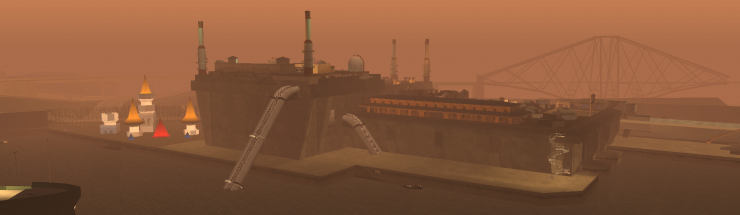
I have uploaded V1.0.2 of the draw distance resource. This resource helps with displaying objects that are normally streamed out. Your maps (even if you are not a mapper) will become a lot more beautiful!

Enjoy the resource as well as your well deserved WEEKEND!!!!
-
Draw distance v1.0.2 This resource improves the draw distance of all your resources that make use of map files. It makes your maps 10x more beautiful in my opinion! Greatly improves the draw distance of map objects Maxed out the draw-distance for peds and vehicles. (See MTA settings > video: Render vehicles always in high detail + Render peds always in high detail ) Multi-resources support (this effect is applied on every mapRoot element) Parallel loading method is used, but the loading speed is in that case reduced to improve performance. The effect is not only applied on resources that are starting, but also resources that are already running. Download here This resource is uncompiled! Repository: https://gitlab.com/IIYAMA12/draw-distance Video - Created by @Anx1ty Comparison Starting at 200 units distance 400 units distance (this is the distance where a lot of objects will be unloaded, but in this case switched with lowLOD objects) And even on 600 units distance, it is technically visible -> (while the fog is slowly eating it up... ) Download here Can all hardware run this? --> I have no idea... most likely ?. Just give it a try.
- 27 replies
-
- 16
-
-

-
- repository
- draw
- (and 8 more)
-
local adminLevelTitels = {"admin-1","admin-2","admin-3","admin-4","admin-5","admin-6"} {"AD",-0.05, "right", function (p) return adminLevelTitels[getElementData(p,"admin_level")] or "I am level 0! HA!" end},
-
I have no idea if engineSetAsynchronousLoading works as Addlibs replied. << I truly hope this solves your issue to be honest But the loading process of that function probably doesn't include the reading of the mod files. In case of loading things in general, I recommend to align the process operation with the user his FPS. Because when you are loading a mod, you are blocking everything, so you can't go to the next frame until it is finished. > That is why loading 2 or more mods on a single frame can cause frame drops. > Large mods will cause frame drops, that is inevitable. If you load a mod every 1, 2 or 3 frames, you will balance performance with processing speed. This example is for loading a mod every frame. Speedy , but with performance impact. So more frames between each execution is better for performance. local table = {{}, {}, {}} function test () local item = table[1] if item then table.remove(table, 1) else removeEventHandler("onClientRender", root, test) end end addEventHandler("onClientRender", root, test)
-
@SoManyTears Because the local declaration ensures that the value is deleted at the end of the function. if cities[city] then if not isElement(sound) then sound = playSound("ambiance.mp3",true) end elseif isElement(sound) then stopSound (sound) sound = nil end setTimer(change_weather, 1000, 0) -- 1 too 0
-
If you enable shared, this is what will happen: <script src="file.Lua" type="shared"/> becomes <script src="file.Lua" type="client"/> <script src="file.Lua" type="server"/> The file is now used for serverside as well as clientside. But they are still loaded on 2 different applications. And as you know, you can't share your memory across the internet without taking the connection delay `ping` in consideration. The concept behind `shared` is a feature to make (utility) functionalities that work on both sides (client/server). Main purpose: Less maintenance The following content could be useful for in a shared file: https://wiki.multitheftauto.com/wiki/FindRotation https://wiki.multitheftauto.com/wiki/Table.random https://wiki.multitheftauto.com/wiki/Table.compare etc.
-
You can tighten the timing a little bit by align it manual. https://wiki.multitheftauto.com/wiki/OnClientPreRender https://wiki.multitheftauto.com/wiki/OnClientRender See example on the following page: https://wiki.multitheftauto.com/wiki/GetTickCount