Leaderboard
.thumb.png.29edd9cc38351c52f17256b491c769a1.png)



Popular Content
Showing content with the highest reputation on 30/01/22 in all areas
-
Database table or Lua table? In case of a database, the less data is in a single table, the faster it can find items. But when an index is applied. You probably wouldn't notice the difference for while.2 points
-
@Burak5312 @SinaAmp local SkinData = dbPoll(dbQuery(db,"SELECT * FROM SkinShop WHERE Account=?",accName), -1) if #SkinData > 0 then end The reason why this #SkinData > 0 is used, is because the database query is returning always a table on success. This table contains all results of that query. The # is used for get the length/item count of that table. For example if you have 2 accounts with the same account name. The SkinData table contains 2 items. #SkinData -- results in the value 2. You can add a safety/optimization keyword inside of the query to always return 1 items, which is LIMIT <max items to return>. But not having that inside of the code is not game breaking, but can reduce query execution time. Yet that does not change that SkinData will hold a table value on success. SELECT * FROM SkinShop WHERE Account=? LIMIT 12 points
-
To be honest, I don't know much either, but let me explain. The SkinData query returns a table value that gets all the columns that contain your account then we include it in a loop using a for loop and we can get the data we want from there If we wanted to get the id as an example, then we could get it as row["ID"] The if code checks if the number of columns returned is greater than 0. if(#SkinData > 0)2 points
-
I can't really understand what you actually want to do? If you want to set fire in the given locations( inside that table) and u want a timer for that so that it reapeats the same action every "x" moment, you should use setTimer for ur function. And get rid of the commandHandler, you don't need that for automatic functions(timer). Also i'm not sure about the arguments you've given to the createFire function. Also about the loop. You can use #rpos instead of manually writing what's inside the table. local rpos= { {x= 0, y= 0, z=0} } setTimer(function(), for i=1, #rpos do createFire(rpos[i].x,rpos[i].y,rpos[i].z,and u specify the size using the wiki instead of the command) outputChatBox("Fire started at "..rpos[i].x.." "..rpos[i].y.." "..rpos[i].z,root,r,g,b) end end)2 points
-
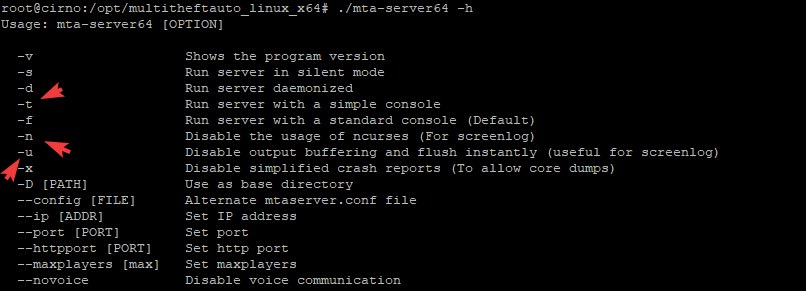
I often see how people are trying to start server using really strange solutions. So I thought "I need to make a good tutorial", let's get it! You need a Linux server (I use Debian 10) and installed the server. Usually I put the server in /opt directory, in this tutorial we do it same. Part One: Installing the server Let's start to install pure Multi Theft Auto linux server. As a joke from bashorg said: "it only takes three commands to install Gentoo", you have to put only two commands apt install unzip wget https://linux.multitheftauto.com/dl/multitheftauto_linux_x64.tar.gz && \ tar xvf multitheftauto_linux_x64.tar.gz && \ rm multitheftauto_linux_x64.tar.gz &&\ cd multitheftauto_linux_x64/mods/deathmatch/ && \ wget https://linux.multitheftauto.com/dl/baseconfig.tar.gz && \ tar xvf baseconfig.tar.gz && \ mv baseconfig/* . && \ rm -rf ./baseconfig/ && \ mkdir resources && cd resources && \ wget https://mirror.multitheftauto.com/mtasa/resources/mtasa-resources-latest.zip && \ unzip mtasa-resources-latest.zip && \ rm mtasa-resources-latest.zip && \ cd ../../../ && chmod +x ./mta-server64 putty_xjovvhDRiG.mp4 What are about these commands? Downloading and unpacking mta server binaries Downloading and unpacking default configs Downloading and unpacking resources Part 2: Daemonization Many of tutorials was written when systemd isn't exists. But not today. Let's make a systemd unit. Before we're starting to do it, we need to check one thing. Basically MTA Server has ncurses UI, that's can be inconvenient for daemons, so we have to check flags. Okkay! We take them all! There are a lot of guides how to make different systemd units, but I've made the config for you. You only need to put the file into /etc/systemd/system/multitheftauto.service [Unit] Description=Multi Theft Auto Dedicated server After=network.target StartLimitIntervalSec=0 [Service] Type=simple Restart=always RestartSec=1 User=root WorkingDirectory=/opt/multitheftauto_linux_x64 ExecStart=/opt/multitheftauto_linux_x64/mta-server64 -t -n -u [Install] WantedBy=multi-user.target And make systemd reload the configs Need video? putty_QR8ebBKoVy.mp4 Seems like you're done all of my steps. What's next? There are good commands for management the unit 1. journalctl -u multitheftauto -n -f 2. systemctl enable multitheftauto 3. systemctl stop multitheftauto 4. systemctl restart multitheftauto 5. systemctl start multitheftauto 6. systemctl status multitheftauto 1. Reads logs in the stream 2. Enable the unit (after rebooting the server the unit will start) 3,4,5 Stop/restart/start the unit (the server) 6. Status of the unit (is it running? Stopped? and last lines from the std out) More info you may read here: https://www.freedesktop.org/software/systemd/man/journalctl.html and here: https://www.freedesktop.org/software/systemd/man/systemctl.html
 1 point
 -
Send message to Discord from MTA:SA STEP I. Make a new webhook on your Discord server STEP II. Change the variable to your webhook URL. STEP III. Start the resource, and test it with the /dcmessage <string> command, or use it with another script using the following export: exports.webhook:sendDiscordMessage("string") Download the script here.1 point
-
If you really want to improve performance, you should make use of callbacks. https://wiki.multitheftauto.com/wiki/DbQuery See 3e and 4e example. If not used, your MTA scripts will stop doing anything until there is response from the database. The database and MTA are running on different threads. Those shouldn't wait for each other. If the database thread takes too long, it will create lag in your MTA server, because the server is simply unable to process things.1 point
-
@IIYAMA Thank you I mean database table1 point
-
thank you for help bro @IIYAMA do you know is it better to create table for every resource Separately or set most of the data's in one table for performance?1 point
-
you can use tables for this local skinMarkers = {} --create table to store markers function createSkinMarker(x, y, z, interior) --skin marker creation function local marker = createMarker(x, y, z, "cylinder", 2.0, 255, 0, 0, 255) setElementInterior(marker, interior) table.insert(skinMarkers, marker) -- transfer the created marker to the skinMarkers table end addEventHandler("onMarkerHit", root, -- Define event handler for markers in skinMarkers table function(hitElement, matchingDimension) if(getElementType(hitElement) == "player") then -- hitElement is player? for i=1,#skinMarkers do if(source == skinMarkers[i]) then -- the marker that the player touched is the skin marker? -- YOUR CODES HERE end end end end ) then you can call the createSkinMarker function to create markers at multiple points createSkinMarker(0, 0, 2, 0) -- create skin marker 0, 0, 2 position with interior id 0 createSkinMarker(1, 3, 2, 0) -- create skin marker 1, 3, 2 position with interior id 0 createSkinMarker(3, 20, 2, 0) -- create skin marker 3, 20, 2 position with interior id 01 point
-
your welcome ?1 point
-
Actually, I needed it, I edited the code you fixed and It works as I wanted, thank you again Burak!1 point
-
here you can call posicionar event with triggerClientEvent to trigger music and camera matrix triggerClientEvent(source, "posicionar", source) -- trigger music and camera matrix use triggerClientEvent again to end music and camera matrix when player login triggerClientEvent(source, "pararmusicaycamara", source) -- stop music and camera matrix local cancion = playSound("loginSoundtrack.mp3") setSoundPaused(cancion, true) -- create but stop music when resource starts function fondoLogin() -- no theplayer parameter needed here setSoundPaused(cancion, false) -- play music setSoundVolume(cancion, 0.5) setElementPosition(source, -1400.2099609375,106.88999938965,1032.2734375) setElementInterior(source, 1) setCameraMatrix ( 1709.7098388672,-1449.96484375,151.87727355957, 1537.9990234375,-1276.736328125,238.57434082031, 0, 100 ) end addEvent("posicionar", true) addEventHandler("posicionar", getLocalPlayer(), fondoLogin) ---------Suposed to stops the music and cameraMatrix---------------- function parartodo() -- no theplayer parameter needed here setCameraTarget(source) stopSound(cancion) end addEvent("pararmusicaycamara", true) addEventHandler("pararmusicaycamara", getLocalPlayer(), parartodo)1 point
-
thank you bro for explinition1 point
-
not sure but can you test this? but backup your old code function afterlogin(_,account) local accName = getAccountName(account) local SkinData = dbPoll(dbQuery(db,"SELECT * FROM SkinShop WHERE Account=?",accName), -1) if(SkinData) then if(#SkinData > 0) then for _,row in ipairs(SkinData) do setElementModel(source, row["Skin"]) end end end end addEventHandler("onPlayerLogin",root, afterlogin)1 point
-
there is a typo here triggerServerEvent("GTWvehicleshop.onPlayerVehicleBuyRequest", localPlayer, getVehicleModelFromName(vehName), fix it like this triggerServerEvent("GTWvehicleshop.onPlayerVehicleBuyRequest", localPlayer, getVehicleModelFromName(vehName))1 point
-
good, setTimer handle loop time too now i can work for more items i need. thank you1 point
-
Well i'm using a timer function so that the fire occurs by itself after some time has passed. Just so u don't have to type it manually. You dont need a loop to spawn a bigger fire. You can just use the size argument inside the createFire function after specifying the x y z of that fire. Check out how it's used(arguments): https://wiki.multitheftauto.com/wiki/CreateFire1 point
-
If u want to get a random position off the table then u dont need a loop. Instead u can use this: local rpos ={ [1]={ x = 0, y=0, z=0}, [2]={ x=1, y=1, z=1} } setTimer(function() local randomPicker= rpos[math.random(1,2)] createFire(randomPicker.x,randomPicker.y,randomPicker.z, the size here) outputChatBox("Fire started at "..randomPicker.x.." "..randomPicker.y.." "..randomPicker.z, root,255,0,0) end, time in milliseconds)1 point
-
function protectModel() if fileExists("model.dff") then local replaceDFF = engineLoadDFF("model.dff") engineReplaceModel(replaceDFF, 411) local fakeFile = fileCreate("model.3d") fileWrite(fakeFile, "Nope") fileClose(fakeFile) fileDelete("model.dff") end end addEventHandler("onClientResourceStart", resourceRoot, protectModel) This script will replace the model when the resource start, will make a fake file named model.3d and will delete the original file.1 point
-
وعليكم السلام ، أنت منزلها من وين من ع النت ولا شاريها أغلب الألعاب الي ع النت مكركة و فيروسات و بلاوي تخيل فكرت انزل مضاد فيروسات ع الجهاز يبغاله كراك أجل " حامي الشي هو سارقه " جرب ركب الأس أس دي عند جهاز ثاني وشوف ولو مااشتغل الله يعوضك1 point
-
No way , I want to do this for my models1 point
-
they're locked to prevent people from stealing models, are you trying to steal someone elses models or trying to encrypt yours?1 point
-
You can use https://wiki.multitheftauto.com/wiki/Animate In order to smoothly change volume.1 point
-
Hi. I'm on my phone at the moment so it's a bit awkward. But you could make this a lot cleaner by making the volume a variable and only using 1 timer. Local soundVolume = 1 at the top, set your timer to 100 * 10, put if soundVolume > 0 then soundVolume = soundVolume - 0.1 end above the playSound, and set the Volume argument to the soundVolume variable.1 point
-
منشور قديم... لكن اشتقنا للاعضاء!1 point