
Leaderboard




Popular Content
Showing content with the highest reputation on 31/01/22 in all areas
-
Well that's easy. You can do this: local skins = {1,2,3} --"nextSkin" is the created button in your window. function setSkin(button) local i = 1 if button == "left" then --if you left clicked the button. if i > #skins then --if it's bigger than the total skin number i= 1 -- set it back to 1. --do whatever u want here. else i = i+1 -- if i is not bigger than the table amount, then increment it. end end addEventHandler("onClientGUIClick",nextSkin,setSkin,false)2 points
-
I haven't tested the code but it could be something like this when the player sees all the skins in the table it will come back to the beginning local currentTableID = 1 addEventHandler("onClientGUIClick", btnContinuar, function() if(currentTableID > #tableSkinsHombre) then currentTableID = 1 end setElementModel(localPlayer, tableSkinsHombre[currentTableID]) currentTableID = currentTableID + 1 end)2 points
-
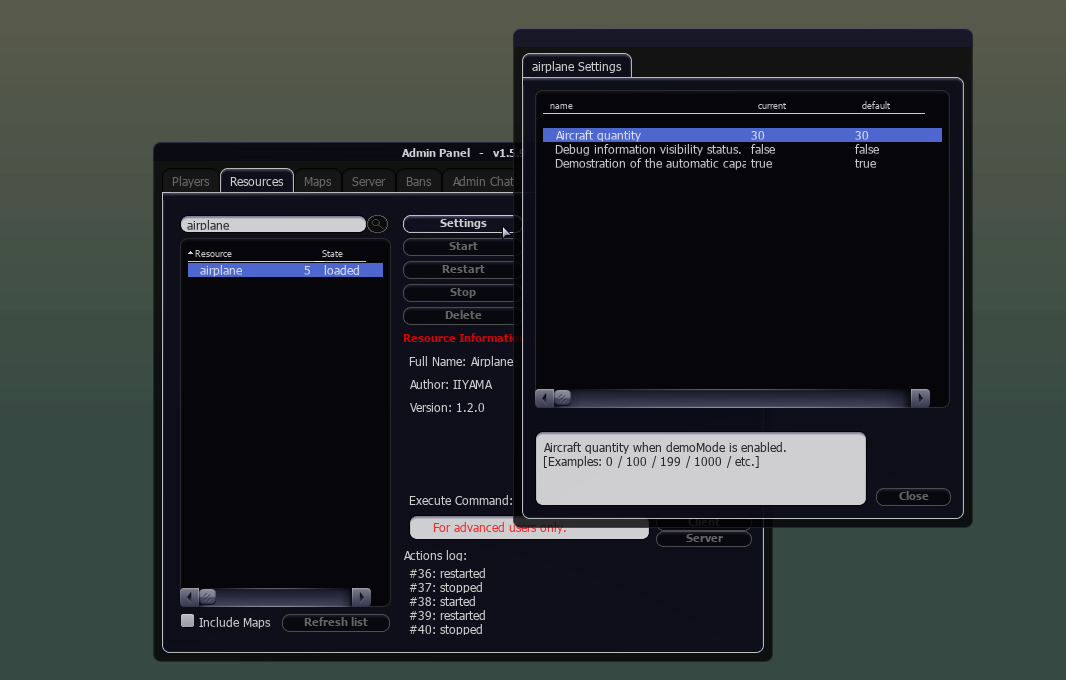
Airplane This resource adds ambient aircraft to your MTA map. As many as you want, as long as the MTA element stream engine likes it. The aircraft models can be modified in config_s.lua. The resource was pre-mentioned in the Server time sync resource, because it is was an example resource which made use of serverside time. (And still makes use of) But by posting updates there for a different resource is a bit confusing. It is beyond a test resource now. Note: you still need to download the server time sync resource for this resource to work. You will be given an option to download server time sync resource, when you the download the resource airplane. The resource doesn't only creates planes, but also helicopters. Which is confusing I know, since the resource name is 'airplane'. But it was already too late for that without losing my version archive. Version 1.2.0 / 1.1.1 video's Admin settings Quantity aircraft Developermode Displaying the airplanes and other useful information. Demomode true - Let the resource create the aircraft false - Fill in your own aircraft list manually in file: config_s.lua How the aircraft is adjusted according to the GTA map. The blue crosses are used to display the max ground height of that specific area(200x200). You see that the crosses are placed higher near trees and buildings. The resource will adjust the aircraft height according to this data. This view is visible when development mode is active and some adjustments in the config_s.lua for the ground height data. Dataset for the aircraft height is available here: https://wiki.multitheftauto.com/wiki/Dataset-map-height Pro's: Low CPU usage after initialization. No network usage after initialization. Only the dependency server time sync will use network usage after initialization. Not that many lines of code for you have to scan through, if you want to modify the resource. Simple to implement. If you find a bug, I will be here. Con's No AI implementation. Brain-dead AI. The 'time based driven (animations)' concept is used, not everybody is familiar with that concept. That makes it harder to edit. It basically means that the aircraft animations are unstoppable, since time doesn't stop either. Pro: Which nearly nullifies the need of constant network usage between the server and the client. All aircraft are indestructible (even if not set to damage proof). (Can also be a pro) But I might add something in the future to counter that... but I first must figure out how that is suppose to work. Does not work outside of the GTA map. Download link: Resource Airplane Other downloads: Resource Server time sync Dataset GTA map height
 1 point
 -
your welcome ?1 point
-
thank you bro also i worked on another way and that worked too but not trust able ? function getpaccount (_,account) local AccName = getAccountName(account) local AccData = dbPoll(dbQuery(db,"SELECT ID,Account FROM stats"), -1) if(isGuestAccount(account)) then return end if (AccData) then if not getAccountData(account, "FirstTime") then setAccountData(account, "FirstTime", true) local ID = getFreeID() local SetData = dbExec(db,"INSERT INTO stats (ID,Account) VALUES (?, ?)",ID, AccName) else return end end end addEventHandler("onPlayerLogin",root, getpaccount)1 point
-
in fact, you can only add it once when the player is a new registration, you don't need to do it this way. local SetData = dbExec(db,"INSERT INTO stats (ID,Account) VALUES (?, ?)",ID, AccName) you can do something like this to avoid multiple column records but I'm not sure it will work function getpaccount (_,account) local AccName = getAccountName(account) local AccData = dbPoll(dbQuery(db,"SELECT * FROM stats WHERE Account=? LIMIT 1", AccName), -1) -- search for a column in the database for this account if(AccData) then if(#AccData > 0) then return end -- do not continue if there is any record end --if there is no such record then save it to the database local ID = getFreeID() local SetData = dbExec(db,"INSERT INTO stats (ID,Account) VALUES (?, ?)",ID, AccName) end addEventHandler("onPlayerLogin",root, getpaccount)1 point
-
It's easy to create fire,but why do u need a health bar for? Instead try showing the players that have the fire deputy job, to see on the radar that a fire occured somewhere. The default fire health is already set by the gta game, that once it gets hit by water, it's health will start draining until it disappears. Unless u have another idea in mind, then state it down below.1 point
-
حبيبنا وإياكم ان شاء الله هذا قضاء الله وقدره1 point
-
Looking good, looking goood!1 point
-
Put false at the end of the onClientGUIClick event so it will only do things when you press the button example: addEventHandler("onClientGUIClick", btnContinuar, function() NombrePersonaje = guiGetText(nombreYapellido) sexo = guiRadioButtonGetSelected(masculino) -----if I try to put the variable (if (sexo==true) here, the script doesn't work and crash------- triggerServerEvent("definirName", getLocalPlayer(), NombrePersonaje) end, false) -- this1 point
-
Can you add the codes of the s_core.lua file to the topic so we can help you?1 point
-
set next element in table?1 point
-
Woww good job mate. Keep up the hard work!!1 point
-
Didn't i just help u with the fire thingy? Now u're requesting a full script?1 point
-
https://wiki.multitheftauto.com/wiki/SetElementModel use: setElementModel (element theElement, int model)1 point
-
your welcome ?1 point
-
@Burak5312 @SinaAmp local SkinData = dbPoll(dbQuery(db,"SELECT * FROM SkinShop WHERE Account=?",accName), -1) if #SkinData > 0 then end The reason why this #SkinData > 0 is used, is because the database query is returning always a table on success. This table contains all results of that query. The # is used for get the length/item count of that table. For example if you have 2 accounts with the same account name. The SkinData table contains 2 items. #SkinData -- results in the value 2. You can add a safety/optimization keyword inside of the query to always return 1 items, which is LIMIT <max items to return>. But not having that inside of the code is not game breaking, but can reduce query execution time. Yet that does not change that SkinData will hold a table value on success. SELECT * FROM SkinShop WHERE Account=? LIMIT 11 point
-
here you can call posicionar event with triggerClientEvent to trigger music and camera matrix triggerClientEvent(source, "posicionar", source) -- trigger music and camera matrix use triggerClientEvent again to end music and camera matrix when player login triggerClientEvent(source, "pararmusicaycamara", source) -- stop music and camera matrix local cancion = playSound("loginSoundtrack.mp3") setSoundPaused(cancion, true) -- create but stop music when resource starts function fondoLogin() -- no theplayer parameter needed here setSoundPaused(cancion, false) -- play music setSoundVolume(cancion, 0.5) setElementPosition(source, -1400.2099609375,106.88999938965,1032.2734375) setElementInterior(source, 1) setCameraMatrix ( 1709.7098388672,-1449.96484375,151.87727355957, 1537.9990234375,-1276.736328125,238.57434082031, 0, 100 ) end addEvent("posicionar", true) addEventHandler("posicionar", getLocalPlayer(), fondoLogin) ---------Suposed to stops the music and cameraMatrix---------------- function parartodo() -- no theplayer parameter needed here setCameraTarget(source) stopSound(cancion) end addEvent("pararmusicaycamara", true) addEventHandler("pararmusicaycamara", getLocalPlayer(), parartodo)1 point
-
معوض خير ?1 point
-
Se o seu MTA crasha na inicialização ou durante o jogo, primeiro você deve visitar a lista de tipos de crash conhecidos (link) ou por meio do spoiler no final deste post e procure pelo crash correspondente ao seu offset (exemplo: "Offset = 0x003F0BF7"> copie e procure por 0x003F0BF7). Caso seu crash específico esteja listado na tabela, o motivo desse crash e as informações de solução são fornecidas nessa página, logo após o offset. Observação: a maioria das pessoas pensará "Ah não, provavelmente não é relevante para mim", mas crashs listados com motivos conhecidos, juntos, representam 85% de todos os crashs do MTA em todo o mundo, e a maior parte do suporte é solicitada para crashs já esclarecidos. Portanto, para obter uma correção mais rápida, recomendamos realmente seguir esta etapa. Se seu crash não estiver listado, baixe e execute o MTADiag e siga as instruções. Se o MTADiag não for executado para você, baixe e instale o Visual C++ 2017 runtimes (usando este link, o download é iniciado automaticamente) Em seguida, crie um tópico nesta seção (Ajudas relacionadas ao MTA:SA (Cliente/Servidor)) e publique qualquer URL do Pastebin que o MTADiag fornecer a você. Se por algum motivo o MTADiag não funcionar, faça o seguinte antes de criar um novo tópico: Instale a última versão do MTA:SA Instale a última versão do DirectX runtime, usando a opção para instalá-lo automaticamente, que deve ser habilitada bi instalador do MTA. Se instalá-los não resolver o problema, tente: Exclua o arquivo gta_sa.set localizado em GTA San Andreas User Files em sua pasta/biblioteca de Documentos (usuários do Windows Vista e 7) ou o diretório Meus Documentos (usuários do Windows XP) Verifique no diretório de instalação do GTA San Andreas se há o D3D9.dll. Se estiver presente, exclua-o. Certifique-se de que sua instalação do GTA San Andreas não seja modificada de forma alguma. Se for - desinstale e reinstale o GTA San Andreas antes de instalar o MTA: San Andreas. Embora o MTA possa lidar bem com a maioria dos mods, isso excluirá a chance de que algum mod esquisito esteja causando problemas sem que seja necessário um longo processo de solução para determinar qual mod específico é o culpado. Observe que quanto mais (tipo de) mods você tiver, maior será o risco de problemas de estabilidade; O MTA tem uma alta tolerância para coisas com as quais não foi projetado para ser compatível, mas tem seus limites. Não podemos garantir suporte se você estiver usando uma instalação modificada enquanto tiver problemas. Inclua também quaisquer mensagens de erro que possam aparecer quando o MTA:SA crashar; copie e cole o log de crash ou tire um print/screenshot. Obrigado! Observação: se você quiser ler mais sobre o MTADiag ou relatar problemas ao usar esta ferramenta, acesse aqui: https://forum.multitheftauto.com/topic/32071-mtadiag-diagnostic-tool-for-mtasa-support-section-information/ Tópico original criado em inglês aqui, graças ao Towncivilian! A página da wiki está offline? Você também pode ver as informações no spoiler abaixo:1 point
-
very nice video, i like it1 point
.png.c62c7574dce4ece3d4d38ef8dbe1f1de.png)
.png.5dd4d9c2442dfb73190e0e10e0b7fe85.png)



.thumb.png.29edd9cc38351c52f17256b491c769a1.png)